Know your business finance in one click.

Bills and bank statements go into Tally with TDS and GST done. Then your MIS and an audit review, every month.

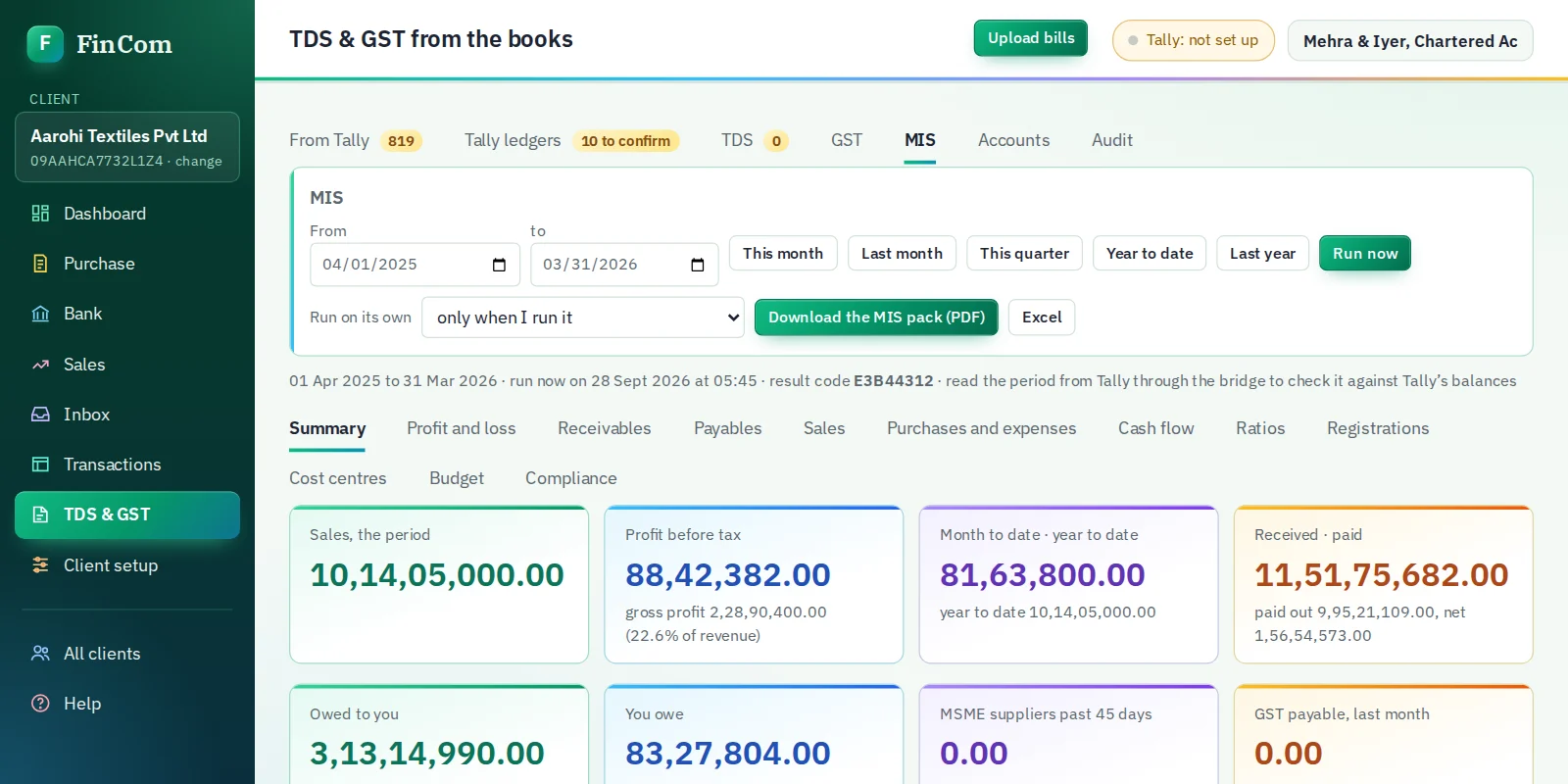
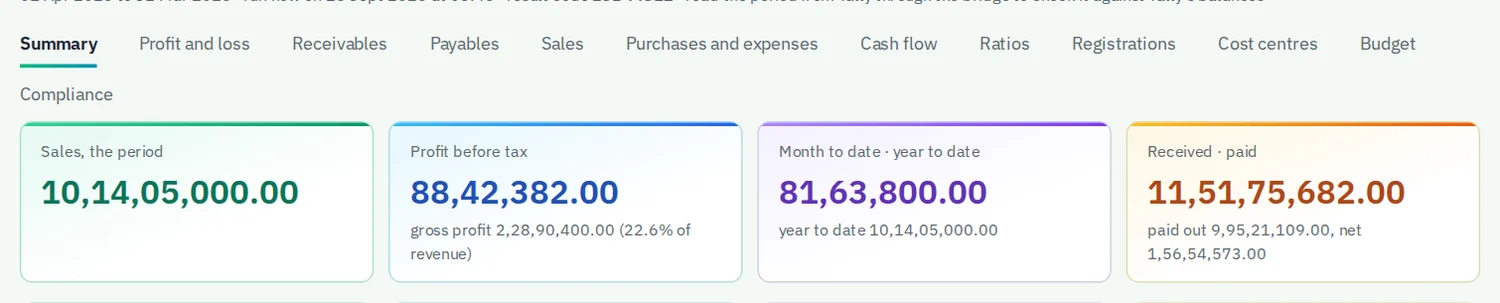
The MIS in FinCom for a year of a textile company's books: sales, profit before tax, cash in and out, money owed to and by the business, and the tax dates coming up
  • New Income-tax Act 2025 sections, with the old section numbers alongside
  • Posts to TallyPrime and reads every entry back to check it
  • Client data stored in India
  • Free OCR that runs on your own computer

MIS and audit review

See how the business is doing, and what needs fixing, before the auditor does.

The MIS summary in FinCom: sales, profit before tax, cash received and paid, money owed to and by the business, MSME dues and GST payable

Your month on one page

Read straight from Tally. Sales, profit, cash in and out, who owes you, who you owe, and what tax is due next.

  • Profit and loss month by month, open to the vouchers
  • Receivable and payable ageing, with MSME dues past 45 days (section 43B(h))
  • Cash flow with a 13-week forecast, ratios, and budget against actual
  • A PDF pack and Excel, made on its own every month if you want
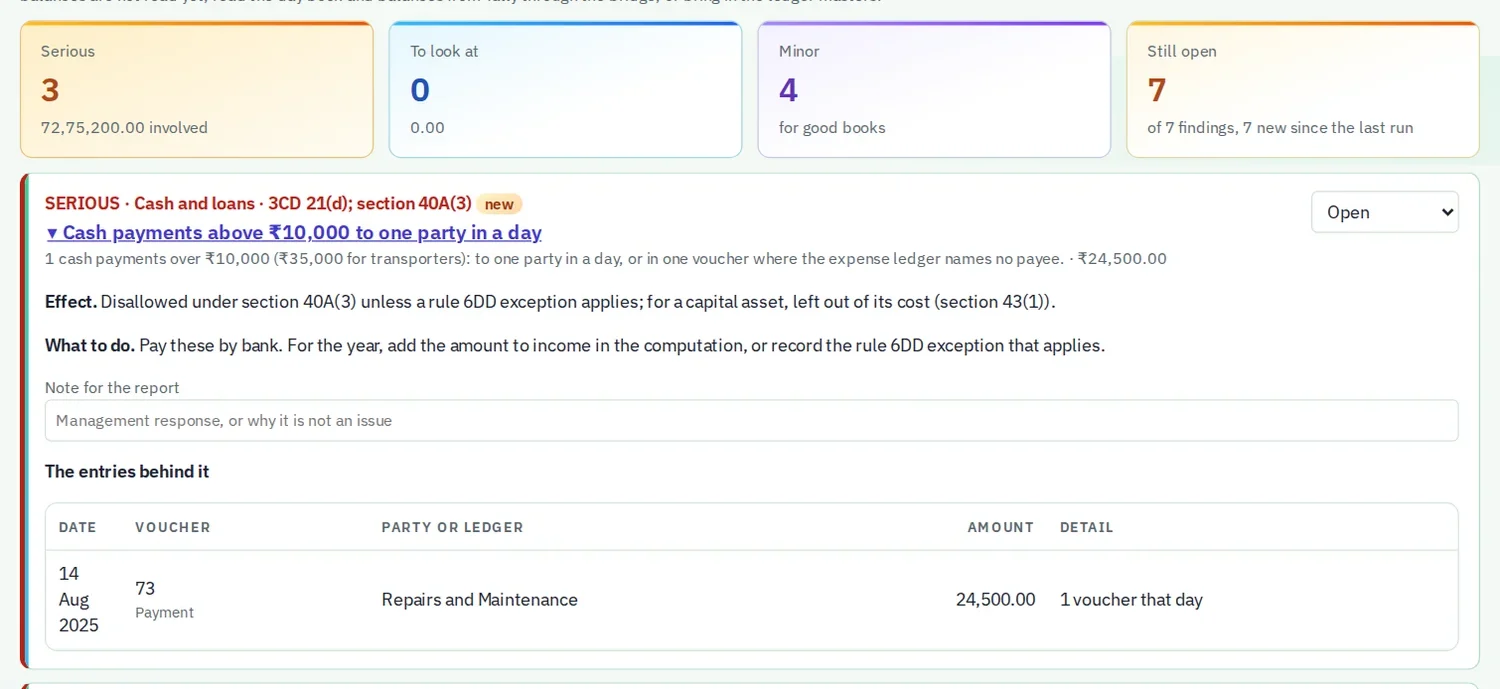
An audit finding in FinCom: a cash payment above 10,000 rupees under section 40A(3), with its effect, what to do and the voucher behind it

An audit review of every voucher

Checks the whole year's books the way an auditor would, and tells you what each finding costs and how to put it right.

  • Cash payments over 10,000 rupees, TDS not deducted, duplicate bills and more
  • Each finding with its tax effect, what to do, and the vouchers behind it
  • Journal entries to pass, ready to post to Tally
  • A report with annexures and a Form 3CD draft for your CA

For the business owner, and the CA who keeps the books.

Business owners

Know where the money is every month, without waiting for the year-end. Your accountant keeps Tally up to date in minutes, not days.

  • Monthly MIS: profit, cash, who owes you and who you owe
  • An audit review that catches tax risks early
  • Bank and vendor balances that match Tally, to the rupee

Chartered accountants and their teams

Run many clients from one account. Your staff share the same data, each with their own login and role.

  • TDS and GST for every client in one place
  • Returns, challans and certificates tracked per client
  • MIS and audit review for every client, on a schedule

What FinCom does

Everything between the paperwork and the return.

Record

  • Purchase bills from PDF, photo or email, read and checked
  • Bank statements in PDF or Excel, turned into receipts and payments
  • Sales invoices and marketplace settlements
  • A shared inbox for documents sent by clients or your office

TDS

  • The right section and rate for each bill, and the yearly limit per deductee
  • Lower-deduction certificates (section 197) and higher rates for non-filers
  • Challans from Tally payments
  • 24Q and 26Q files ready for the FVU

GST

  • GSTR-1, GSTR-3B, IFF and GSTR-1A worked out from the books
  • 2B and IMS matching, with follow-ups for missing credit
  • Amendments, advances and ITC reversals
  • GSTR-9 and 9C, and filing through the GST API

MIS and audit

  • Monthly MIS: profit, cash flow, ageing, ratios and budget
  • Audit review of every voucher, with a Form 3CD draft
  • Financial statements from the Tally books
  • Bank and vendor ledger reconciliation against Tally

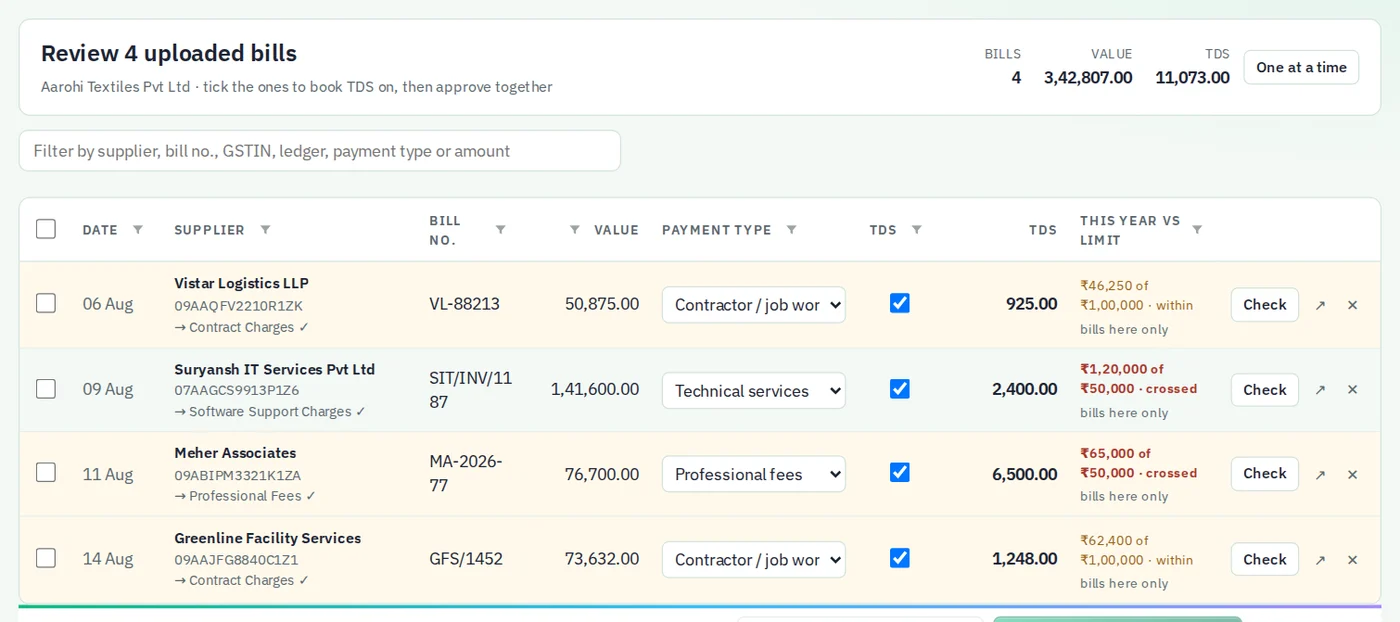
A month of bills, reviewed in one table.

Every bill shows its TDS section, the tax, and how far the vendor has gone against this year's limit. Tick the ones you agree with and approve them together.

A table of uploaded bills with payment type, TDS and each vendor's running total against the yearly limit

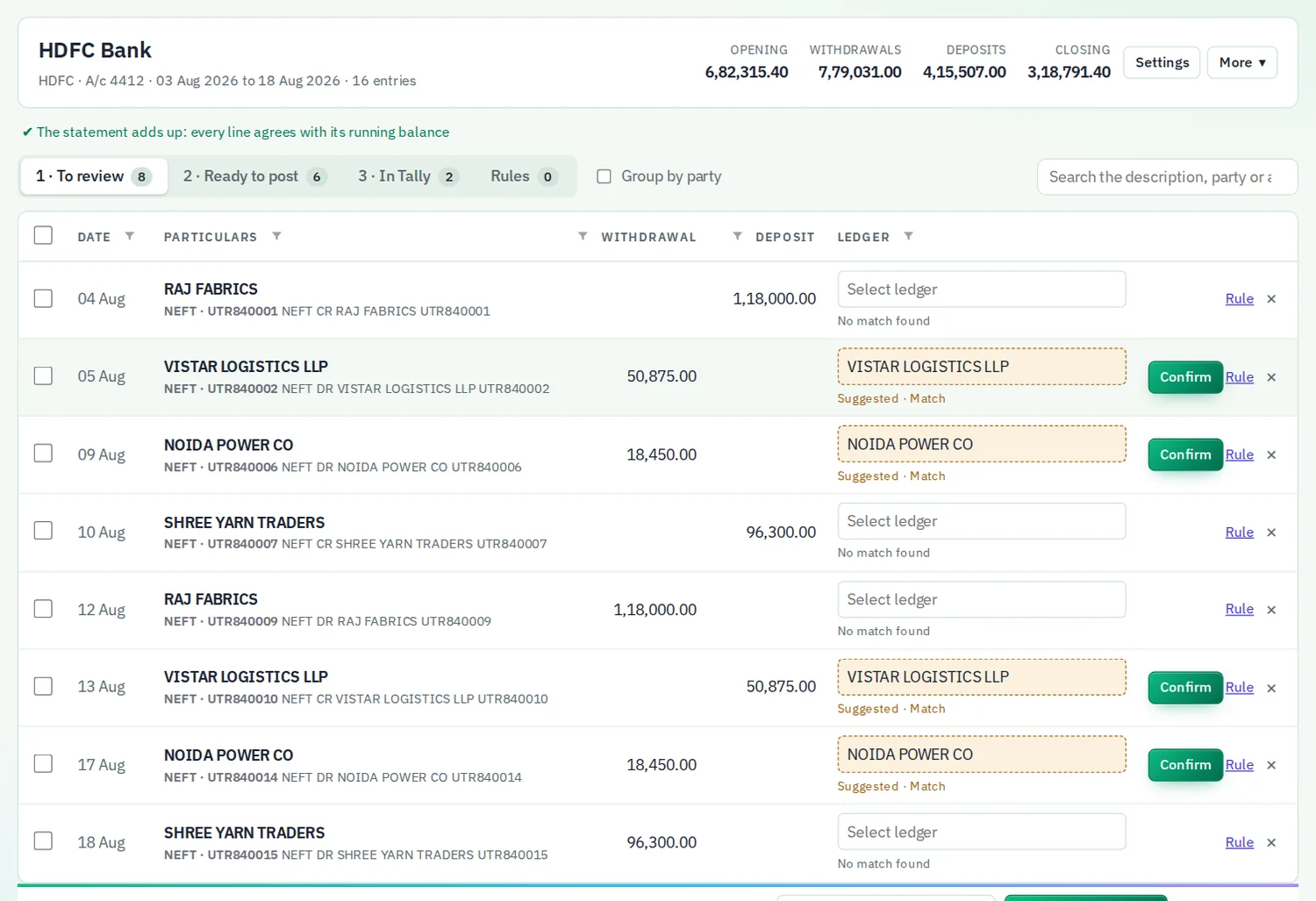
Bank statements that add up before they reach Tally.

Each statement is checked line by line against its running balance. Lines are matched to your ledgers by rules you set once, then posted in batches.

A bank statement in FinCom with opening and closing balances, and each line waiting for a Tally ledger

Works with the TallyPrime you already use.

A small program, the Tally Bridge, runs on the computer where Tally is open. Nothing about Tally is opened to the internet.

  1. FinComin your browser
  2. Tally Bridgeon your computer
  3. TallyPrimeyour company

Posts in batches

Hundreds of entries go in one run. Nothing is sent without a valid date inside the company's books.

Reads back and checks

After posting, each entry is found in Tally again and the bank balance is compared with the statement.

Fixes differences

If Tally and the statement disagree, you see each difference, with a button to post what is missing or remove a wrong entry.

Security

Your clients' books stay yours.

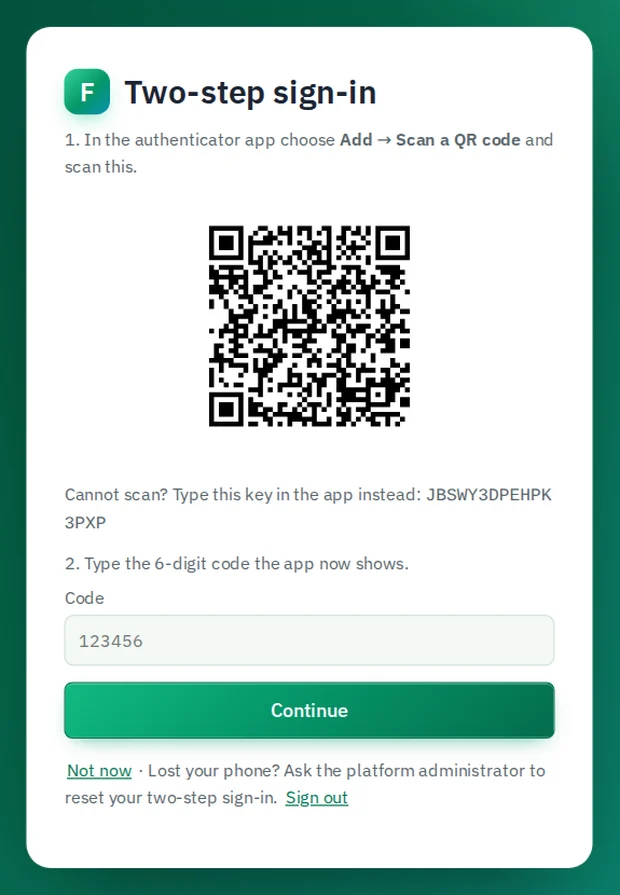
The optional two-step sign-in set-up in FinCom, with a QR code to scan in an authenticator app

Access

Each firm's data is walled off by the database itself. One firm can never read another's.

Signs out after 30 minutes without use, and ends the session on the server too.

Your last sign-in is shown every time. Add a code from your phone as a second step if you want it.

Data

Stored in India, in the Mumbai region, encrypted at rest and in transit.

A permanent audit trail of sign-ins, posts to Tally and deletions. It cannot be edited.

Scripts on the site come only from our own servers. No passwords or keys are kept in your browser.

When you choose AI reading for a difficult bill, its image is sent to Anthropic or Google for reading only. Their terms do not allow it to be used for training.

Certification and compliance.

Where we stand today, stated plainly.

ISO/IEC 27001:2022

In progress

Our information security management system is written against all 93 Annex A controls. The certification audit follows.

VAPT

Scheduled

Independent testing by a CERT-In empanelled auditor. The summary report will be shared with clients on request.

DPDP Act 2023

In progress

Data used only for the work you ask for, deleted on request, and firms told without delay if anything goes wrong.

CERT-In Directions 2022

In place

An incident process with reporting to CERT-In within 6 hours, and an audit trail kept for at least 180 days.

FinCom is not yet ISO 27001 certified. We will publish the certificate and the VAPT summary on this page when they are issued.

Questions firms ask us.

I run a business, not a CA firm. Can I use it?

Yes. Register your business as the account and add your own company. Your accountant can work in the same account with their own login, and you see the MIS and audit review yourself.

Do I need to install anything?

FinCom runs in Chrome or Edge. To post to Tally, you install the Tally Bridge once on the computer where TallyPrime runs. It needs no administrator rights.

Which version of Tally does it work with?

TallyPrime, with the company open and TallyPrime set to act as a server (F1 Help, Settings, Connectivity). Each user's Tally can use its own port.

Can my staff use it for different clients?

Yes. The firm owner adds people with their own login and a role: owner, staff or read-only. Everyone sees the same clients and data.

Where is our data kept?

In India, in the Mumbai region. Each computer also keeps a working copy, so work carries on if the internet drops, and syncs when it is back.

Is our data used to train AI?

No. AI reading is used only for bills the free OCR cannot read, and only when your firm allows it. Anthropic and Google do not train on this data under their terms.

What if something is posted wrongly?

Every post to Tally is recorded. The reconciliation shows any entry that does not belong, and it can be removed from Tally with one click after you confirm.

See your business clearly this month.

Register, add your company, and bring in a month of bills and bank statements.